Fully Private
Meetings & Calls Recorder
Record and transcribe any meeting or call, then let AI turn it into a summary with action items - privately, on your Mac. No bot shows up, and your audio stays on your device.
No bot in the room · Audio stays on your Mac · AI your way - hosted or on-device · Mac App Store
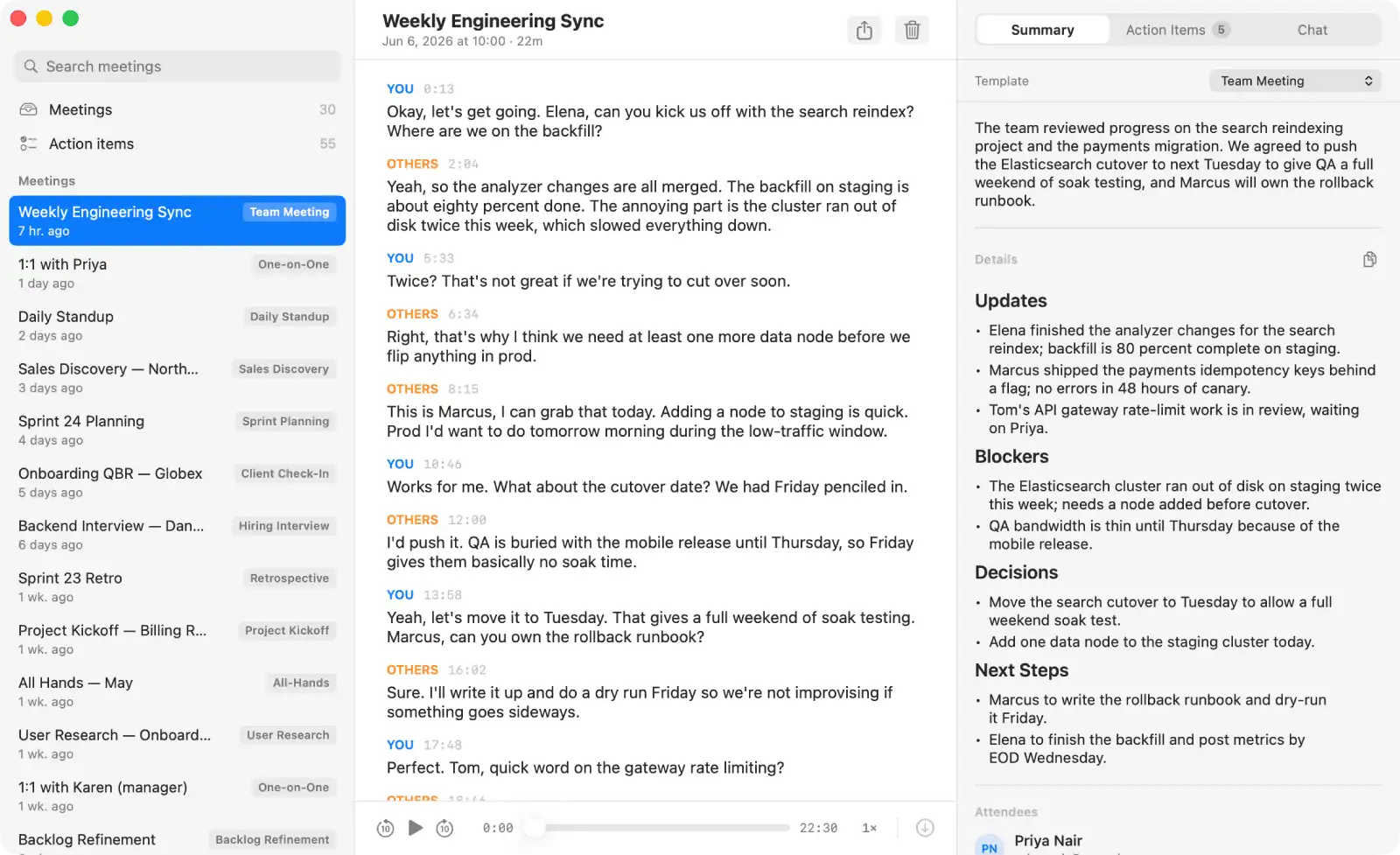
No bot in the room
Nothing joins your call, nobody's notified
Audio stays on your Mac
Recorded and transcribed on your device
AI your way
Instant hosted summaries, or run it all on-device
Sound familiar?
It all goes to their cloud
Granola, Otter, and Fathom upload your audio, transcript, and notes to their servers.
Their AI reads it all
Every summary is generated in someone else's cloud, on an account you don't control.
A bot in every call
A note-taker joins as a participant - and everyone on the call can see it.
Off-limits for real work
Legal, health, and regulated teams can't hand confidential calls to a third party.
Your recordings and transcripts are made entirely on your Mac - no bot in the call, no audio uploaded, nothing feeding someone else's model. Turn on AI summaries and you choose how: fully on your Mac, our hosted service, or your own provider key. Even then only the text leaves, only if you ask, and no one keeps a copy.
No bot
No bot ever joins your call
Otter, Fireflies, and Read.ai send a bot into your meeting - a silent guest everyone can see, recording to their cloud. MeetingMemo records what your Mac hears instead. Nobody gets added, nobody gets a notification, and there's no virtual audio driver to install.
Nothing joins the meeting
No participant, no notification, no awkwardness - your meeting stays your meeting.
Both sides, captured cleanly
Your mic and the call's audio together (You + Others), with no BlackHole or Loopback to set up.
Works everywhere your Mac plays sound
Zoom, Teams, Google Meet, FaceTime - even a phone on speaker.
Everything you need
A meeting recorder built privacy-first, for how professionals actually work
On-Device Transcription
Transcribed on your Mac, not in someone's cloud
Two on-device engines - Apple SpeechTranscriber and WhisperKit (99 languages) - turn speech into text live, right on the Neural Engine. The transcript appears as people talk, and your audio is never uploaded to be transcribed.
Others
You
Others
You vs Others
Captures both sides of every call
MeetingMemo records your microphone and the system audio at the same time, so the whole conversation is captured. Your voice is labeled You, everyone else is Others - no guessing, no diarization, just clean two-sided transcripts.
AI Summaries & Action Items
Private summaries, your way
MeetingMemo writes your title, summary, and action items - and you decide where the AI runs. Keep it fully on-device so nothing leaves your Mac, use our hosted service that stores nothing, or connect any provider you like for the strongest models. Whatever you pick, only text is ever involved - never your audio.
Chat With the Meeting
Ask your meeting anything
Forgot what you agreed on? Just ask. "What did we decide on pricing?" "What did I commit to?" MeetingMemo chats with that meeting's transcript and nothing else - no web, no other meetings. It runs on our hosted service, your local model, or your own cloud key, keeps a thread per meeting, and syncs across your Macs through your private iCloud.
Meeting Templates
The right summary for every kind of meeting
18 built-in templates - 1:1s, standups, sales calls, user interviews, brainstorms, and more. MeetingMemo picks the right one from your calendar and the conversation, and you can switch and regenerate any time.
Weekly 1:1 - Sam & Alex
in 1 minute · 2 attendees
Calendar Integration
Knows your schedule, never records without asking
MeetingMemo reads your calendar to name meetings, link recordings, and show who's attending. One minute before a call it asks if you'd like to record - it never starts on its own. Recording is always your decision.
Private iCloud Sync
Syncs across your Macs through your private iCloud
Meetings, transcripts, action items, and audio sync between your Macs through your own private iCloud - never a MeetingMemo server. Works fully offline too, with everything kept on-device.
Privacy
Exactly what happens to your data
Three simple truths about where your meetings live.
Audio stays on your Mac
Your recordings never leave your device. Ever.
On-device by default
Transcription and summaries run on your Mac; text leaves only if you pick a hosted or cloud option.
Sync on your terms
Data syncs only through your own private iCloud, if you turn it on.
Your audio never reaches a server we run - so there's nothing for us to leak, subpoena, or breach.
Read the Privacy PolicyBuilt for people who can't put meetings in the cloud
If confidentiality is part of your job, your conversations deserve to stay on your Mac.
FAQ
Questions, answered
The real things people ask before trusting a meeting recorder - answered straight, including the limits.
Does it record both sides of a Zoom, Teams, or Google Meet call?
Does a bot join my call?
Does my audio ever leave my Mac? Does it work offline?
Do you train AI on my meetings?
Do I need my own AI provider, and does it cost extra?
Can AI summaries really run 100% on my Mac?
Which AI providers can I use, and where does my transcript go?
How accurate is the transcription, and which languages does it support?
Can it tell who said what?
What does it cost - is there a trial?
What do I need to run it?
Do I have to tell people I'm recording?
Can I get my data out, and does it sync between my Macs?
Get MeetingMemo
Try every feature free for 30 days. No card to start.
30-day free trial · Mac App Store · Family Sharing for up to 6
macOS 26+ · Apple Silicon · On-device & sandboxed
Questions?
Feature request, a privacy question, or just want to say hi - we'd love to hear from you.
a@shelestov.com→